 Legible
App for the Webflow Designer
Grey text looks elegant to you. Can your visitors read it?
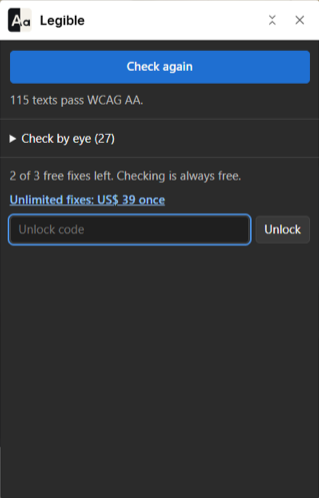
Legible checks every text on the page against WCAG AA while you design. It tells you which class fails and changes that class to the nearest color that passes.
Three bedrooms, a garden, and no way to read this price.
Drag it, or press Fix: the same math the app runs.
What it reads that your eye skips
- The real color. It follows inheritance, combo classes and variables, including variables that point at other variables.
- What is behind it. Backgrounds from parent elements count, and so does transparency on both layers.
- The right threshold. 4.5:1 for body text, 3:1 from 24 px, or from 18.66 px when bold.
- One row per class. A class used 40 times with the same background is one problem, not 40.
What it won't pretend
Text over a photo or a gradient has no single background color to measure, so Legible lists it under "Check by eye" and leaves the call to you. It reads the current page, at the base breakpoint, in the default state. Passing contrast is one WCAG criterion: it does not make a site compliant, and overlay widgets don't either.
Pay once, or don't
Free
US$ 0
Unlimited checks on every page, every suggested color, and 3 one-click fixes.
Unlimited fixes
US$ 39 one payment
One-click fixes with no limit. No subscription and no account. You buy from inside the app and paste the code you get.
Questions
Does a fix change only one element?
No. It changes the class, so every element using that class changes too. Legible tells you so when it happens. To go back, set the class color again in the Style panel.
Does it send my site anywhere?
No. It makes no network requests. Everything runs in the panel, in your browser.
Which Webflow plan do I need?
Any plan, including the free Starter plan, as long as you can open the site in Design mode.